This article assumes a basic familiarity with transformers and linear algebra. I’ll keep the walkthrough intuitive and concrete, but I’m not reintroducing those foundations from scratch.
When Google dropped an algorithm that compressed the KV cache by 6x, I had to deep dive into how it worked. But all the resources I could find used really complex math notation and were not really intuitive or easy to follow. So I decided to use a toy example with concrete numbers to teach myself every single operation that goes on underneath the hood. I want to explain this as if you were inventing this yourself.
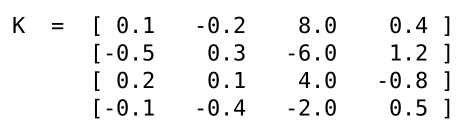
So our goal is to compress the KV cache. Well, the easiest and naive way to do this would be to just quantize our values which would reduce the total number of bytes stored in memory. But this is not as easy as it sounds. Quantizing requires you to create buckets and assign your values to one of those buckets. For example, If you had a vector , you could have 2 buckets (let’s say {1.85, 5.95} by taking the mean of the data and using the half-way points of each side of the mean) and each value in would get assigned to one of these buckets, depending on their numerical proximity. So in this case, 0.1 -> 1.85, -0.2 -> 1.85, 8.0 -> 5.95, 0.4 -> 1.85, which would result in looking like (1.85, 1.85, 5.95, 1.85) and this would effectively require less precision to store than the original vector. But we have a problem: 8.0 is significantly larger than the other values and as a result, causes the buckets to be less precise. The only reason we need the 5.95 bucket is because of the outlier 8.0. If we remove or normalize 8.0, we would have more precise and constrained buckets which would preserve our original values more faithfully. Unfortunately, having these outlier activations is very common in large matrices.
PolarQuant
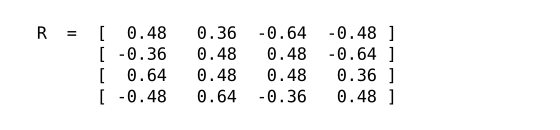
To solve this issue, we can apply a clever mathematical trick. By multiplying our matrix with an orthogonal matrix1, we can normalize the values in such that they fall in a Beta distribution, while still preserving the inner products (which is the only thing that matters when computing attention scores). The reason this works is because the orthogonal matrix acts like a mathematical blender. Instead of letting a massive outlier sit in one single spot and ruin our buckets, matrix multiplication shatters that outlier and smears its value evenly across every single dimension in the vector.
This orthogonal matrix can be completely different formats depending on which hardware you’re optimizing for – it can either be a hadamard matrix (entirely made up of 1s and -1s) or a random orthogonal matrix with regular values. Using a hadamard matrix completely eliminates the need to do a matrix multiply (since multiplying with 1 and -1 would just be a large sum), which is helpful on devices with less parallel computing power, but on production GPUs, it’s easier to just multiply by a random orthogonal matrix, which is what I’ll be using in this example. Before we do this however, the first step is to normalize our matrix and turn it into a unit vector to prevent the quantization buckets from being overly large.
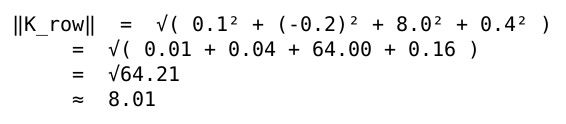

We also store this norm for future use. Once we do that, we can multiply with the orthogonal matrix :
Clearly the values here are more evenly distributed:
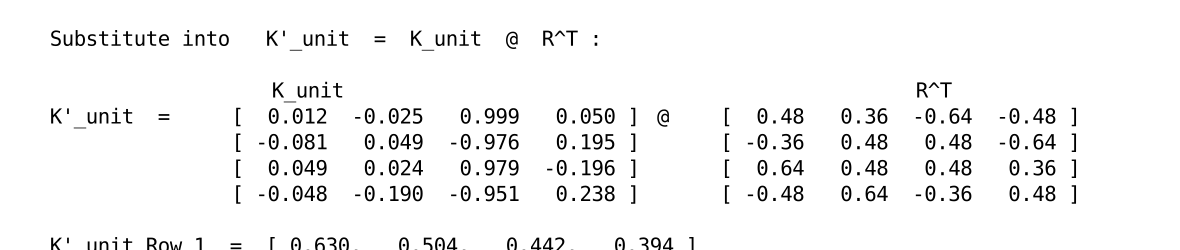
Note: I’ll only be using Row 1 of for the example going forward because all math applies to each row.
Quantization
Now that our values are normalized, we can apply quantization using the Lloyd Max algorithm. The naive way to quantize would be to create a uniform distribution of buckets (i.e. -1, 0, 1 for a range of -1 to 1). But a uniform distribution doesn’t really work for LLMs because most values are concentrated around 02 and a few outliers would cause the buckets to be imprecise. So we use something called the Lloyd Max algorithm instead to create the buckets. It works as follows:
On a standard bell curve, n random points, called centroids, are chosen (n being the number of buckets we want to have)
Halfway between each point, a boundary is created
The mean of each bucket is calculated and the centroids move closer to the center of mass of the data (whichever side of the boundary has a higher mean)
The boundaries are adjusted to be halfway between the points again
Steps 3 and 4 are run in a loop until the mean-squared-error (MSE) is as low as possible
If we apply it on our vector, we get [-0.6, -0.2, 0.2, 0.6] as our buckets and our quantized vector would be [0.6, 0.6, 0.6, 0.2]. Normally, we’d store these values in our HBM to be used later during decode. However, we can apply one more trick to further reduce our memory footprint: we can simply store the binary indices of the buckets and then have a corresponding dictionary in the SRAM to retrieve the original values! Our quantized vector is [0.6, 0.6, 0.6, 0.2] and if we look at the binary index of each value’s bucket in the vector of buckets ([-0.6, -0.2, 0.2, 0.6]), we get [11, 11, 11, 10]. So to recap, through quantization, we reduced the number of bits we need to store from 16 * 4 = 64 to 2*4 = 8 bits – an 8x reduction!
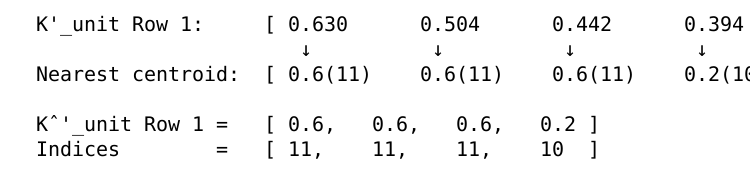
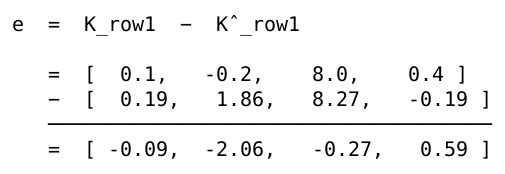
Now, we quantized quite a bit, but how do we find the error between the original vector and the quantized vector? Well, turns out, we can just apply the inverse transformation and instead multiply the quantized by . By applying the inverse transformation, we can reconstruct most of the original vector from the quantized version and if we multiply the result by the norm we stored earlier, we get our fully reconstructed vector:

The error calculation is pretty straightforward:
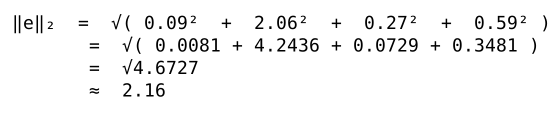
We also store the error norm to use later:
3. QJL Projection
Our original vector can be represented as . When we’re calculating our attention scores, this becomes . This means we would need to store the entire matrix during prefill to use it again during decode, but that would defeat the whole purpose of quantizing . So what we can do instead is compress by encoding into a lower-dimensional space. We initialize a random matrix and multiply it by to compress it into fewer dimensions.
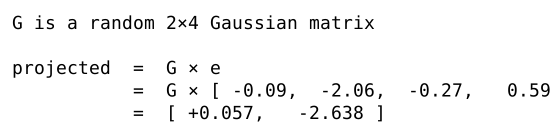
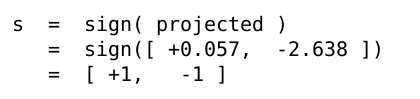
Then we compress it further by only storing the sign of each element. We can create a mapping (+ -> 1, - ->0) which lets us store binary values, so we end up only storing 2 bits, as well as the FP16 error norm value.

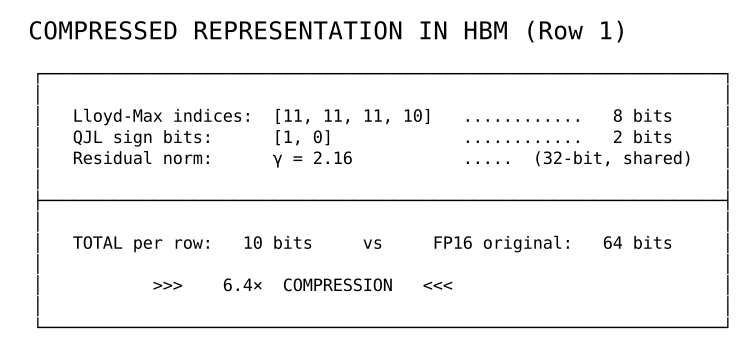
That’s pretty much it for prefill – we repeat this process for every head in every layer.
Decode
Decode is a lot more straightforward. It’s mostly just retrieving all of the values we stored during prefill.
As I said earlier, our attention score calculation expands to .
First we calculate the dot product of and our reconstructed :

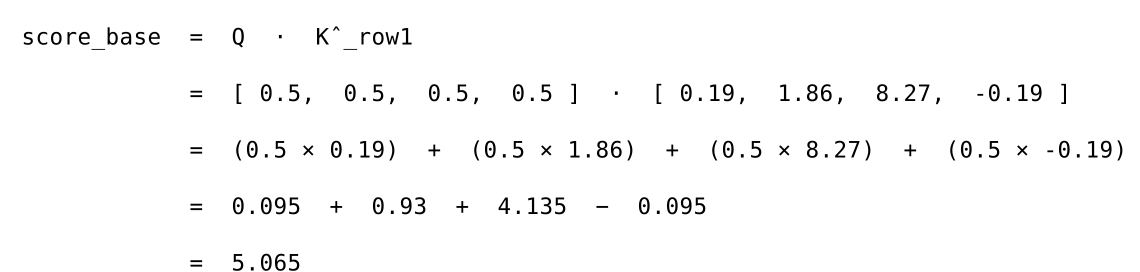
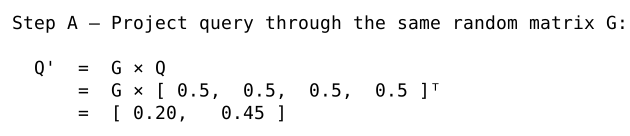
Then we need to do (s is just the stored signed version of ), but we can’t directly do that. Because is in a lower dimension, we need to project to the same dimension before calculating the dot product. So we multiply by the same matrix we used to compress to :
Now that they’re in the same dimension, we can do :
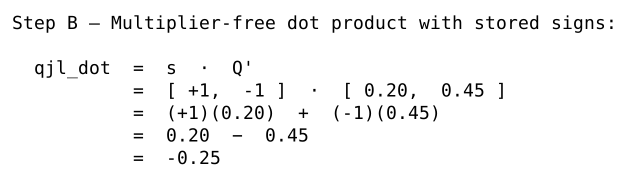
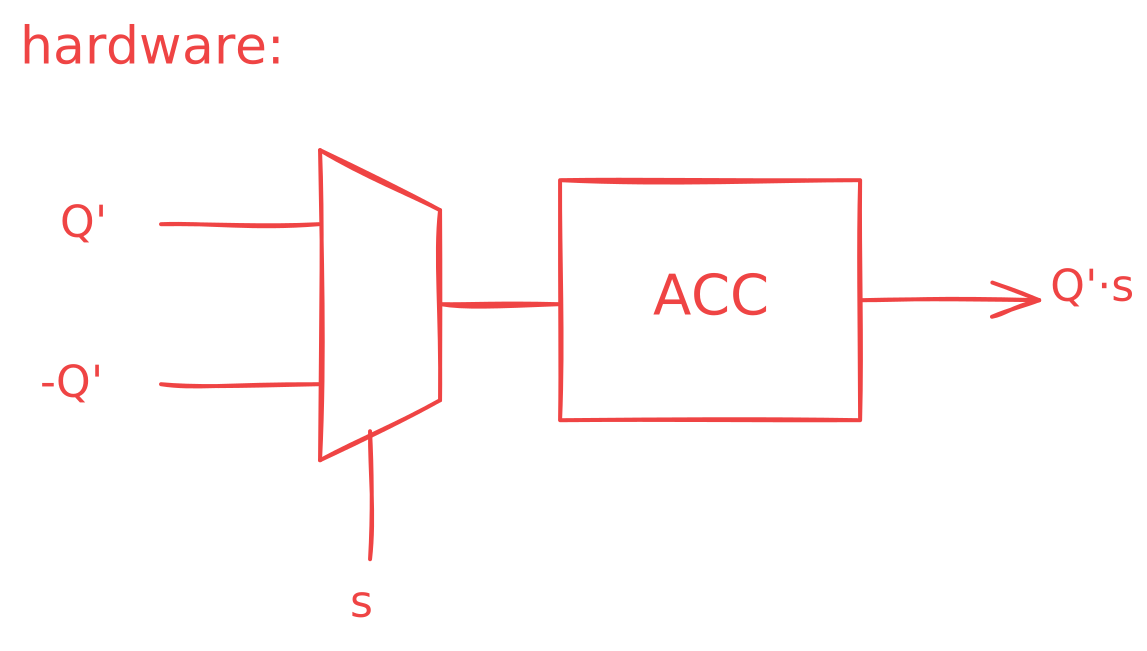
You might realize that this actually is just one large accumulated sum because all of is either 1 or -1. This means we don’t actually have to do multiplication!!!. We can simply use a MUX to choose whether to add or subtract a given element from and send those values to an accumulator! I thought this was a pretty neat trick when I found out.
Now we can just multiply the result of with and a scaling constant to get the QJL correction:
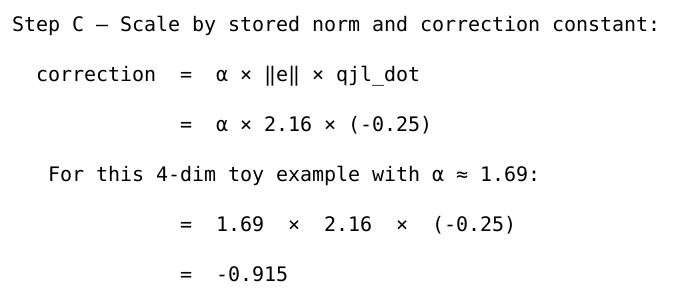
Aside on the scaling constant:
Traditionally, the formula used for would be , where is the compressed row dimension of the matrix, since would normally be square.
But that formula only works for large amounts of numbers, so for our toy example, we’ll use .
The reason we need is because when we use the function, we strip away the magnitude of each number. The expected value of a random number in a normal distribution ( is a normally distributed Gaussian matrix) is . To restore the value of the original number, we multiply by the reciprocal, .
But that’s not enough. We also have to multiply with because when we multiply s, we’re literally adding the values in . As a result, the sum is dependent on how many values holds, which is defined by . So to keep the sum from exploding and making our attention scores very large, we normalize the sum over .
We can get the final attention score by adding and the QJL correction.
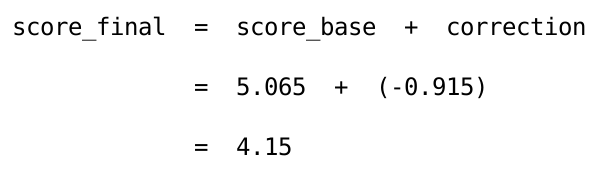
Let’s compare this with the original attention score:

We can see that it’s the same! With larger matrices, we’d have more error, but it would still be around 98% accurate as shown in this implementation.
An orthogonal matrix is a matrix that, when multiplied by its transposed version, results in the identity matrix.
This is due to something called the Central Limit Theorem, which you can read about here: Central Limit Theorem.
Sources